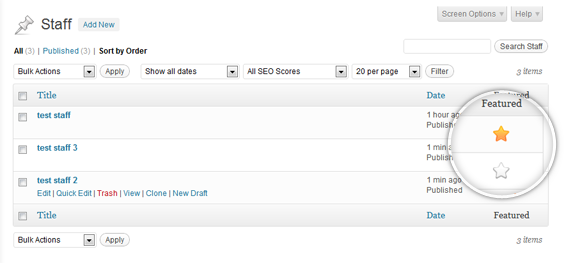
Featured Posts and Custom Posts WordPress Pluigin

Publish by Jeremy Selph Date: Comments: 15 responses
When working on WordPress themes, we tend to use a lot of custom post types. This gives the end- user custom little sections to manage content in. Often enough we see the need to be able to feature posts or custom posts of custom post types (cpts).
This can be accomplished by using a bunch of different Featured Posts Plugins. And we probably have used all of them over the years. To date we have yet to find one that didn’t conflict or break somehting in our WordPress themes. So we created our own, to be specifc we created our own to be easily used with Posts, Custom Posts, and with the Simple Page ordering plugin that we install on every WordPress Theme that we develop.
To use:
- Download the feature-posts-and-custom-posts.zip file to your computer.
- Unzip the file.
- Upload the feature-posts-and-custom-posts folder to your /wp-content/plugins/ directory.
- Activate the plugin through the Plugins menu in WordPress.
- In your theme and in the template you need the featured functionality uses a custom query like this ‘query_posts(‘post_type=professionals&posts_per_page=-1&meta_key=_jsFeaturedPost&
meta_value=yes’);’ to grad all of the featured posts.
Sorry its me again, Your plugin is working great, was just wondering if there is an easy way to remove the featured post option from a custom post type?
thanks
Yes you can do it through code in the plugin or the quick solution is when viewing your list of posts click the screen options tab and uncheck featured. If you want an example and where to edit the code I can post that as well.
Brilliant thanks, I think just hiding it with the screen options should be sufficient.
Hey, I have some custom post types setup and when I use this plugin its doubling up on the star icon for the custom post types. It works great on the normal ‘post’ type but theres 2 stars on all my custom post types? also when I’m looping through my featured post I can only get one to show up even though I have 3-4 featured posts, any ideas? thanks for the great plugin.
mmm, not sure I haven’t seen this issue yet. Email me a screenshot of the double star issue to jselph@reactivedevelopment.net
As far as only one featured showing up in the query when you have 3 featured, post your query so I can see it, do you have posts_per_page = -1 or 1, and troubleshoot with no taxonomy or category parameters.
Hey, thanks for the reply below is my query and image of double star issue
array( ‘post’, ‘work’, ‘people’, ‘events’ ), ‘posts_per_page’ =>-1, ‘meta_key’=>_jsFeaturedPost,’meta_value’=>yes));
?>
Screenshot:
http://tinypic.com/r/rvwzye/6
thanks
The first thing that I noticed in your query are missing quotes. I am not sure if you just typed that example or that is what your code actually is. But just in-case here is what my query would look like.
$myQuery = array( ‘post_type’ => array( ‘post’, ‘work’, ‘people’, ‘events’ ), ‘posts_per_page’ => -1,
‘meta_key’ => ‘_jsFeaturedPost’, ‘meta_value’ => ‘yes’, ‘orderby’ => ‘menu_order’, ‘order’ => ‘ASC’ );
Double check your query and get back to me.
The double star issue is wierd, inspect the element using firebug or chrome and check for these three items:
Thanks for getting back to me, and sorry for the delay, just been busy.
I managed to get my loop query working now…. oops thanks for that.
But I’ve still got the weird problem of double stars. it seem from fire bug that its adding two a tags with the same postFeatured_116 id etc. This only happens to my custom post typres.
any ideas? thanks
Mmm that is weird, I will look into it today. If I cant get it to work on my dev server today and if you are okay with it I would like to test on your server.
Im currently only on a localhost MAMP server, so not sure how that would work? could it be something to do with how I’m setting up my custom post types? thanks
MMM, yea it could. Are you using a plugin to setup your cpt? If not email me your code jselph@reactivedevelopment.net
I just had the same issue on a template I am developing. Change line 71 in plugins/js_featured_posts_and_custom_posts.php from
$post_types = get_post_types( array( ‘public’ => true, ‘_builtin’ => false ), ‘names’ );
to
$post_types = get_post_types( array( ‘public’ => false, ‘_builtin’ => false ), ‘names’ );
let me know if there are any other issues.
Ha, lucky for me you had the same problem..
Thanks a lot for your help on this, plugin is now working great.
cheers
This is potentially what I’ve been looking for – I would like to display custom post types from Events Manager in a featured posts slider, but I’m not sure how to use this plugin, it’s a bit unclear.
This plugin and all of our plugins are intended for developer use. All it adds is an easy way to feature posts, by adding a a post_meta or custom field called _jsFeaturedPost. I have never used the events manager plugin, we have our own CPT for that, but yes this plugin can be easily integrated into that plugin if you have some PHP experience.
To filter your results in the slider query I would have this to only show featured posts, meta_key=_jsFeaturedPost&meta_value=yes.
If you don’t have PHP/WordPress Development experience and would like to hire us, give us a call at 732-333-8006.